
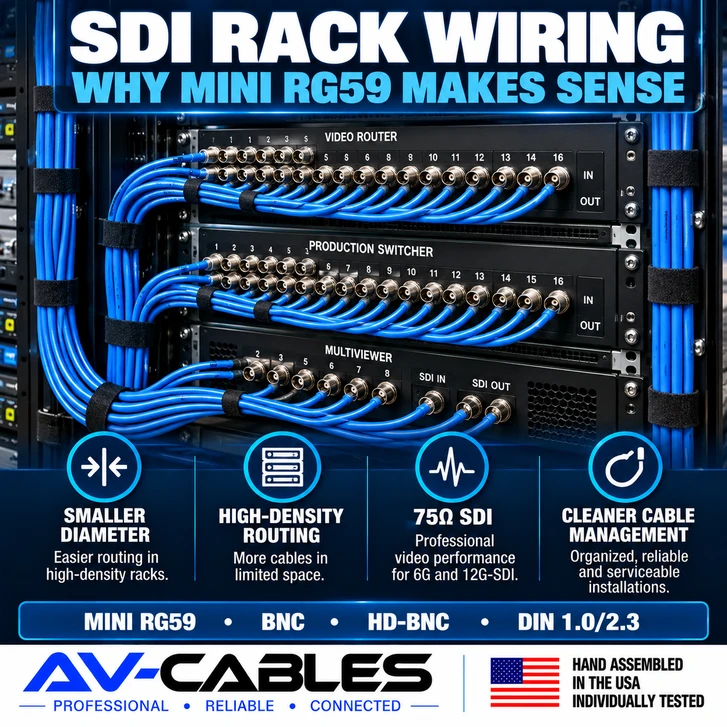
A broadcast rack may contain dozens—or even hundreds—of video connections between routers, switchers, monitors, converters, recorders and other equipment.
In these installations, choosing an SDI cable isn't only about maximum transmission distance.
Cable diameter, flexibility, connector size, rack density and serviceability can become just as important.
That's where compact professional coax such as Mini RG59 can make a significant difference.
Let's look at how to choose SDI patch cables for professional broadcast racks and why smaller coax is often useful for short, high-density connections.
WHAT IS AN SDI PATCH CABLE?
An SDI patch cable is a relatively short 75-ohm coaxial cable assembly used to connect professional video equipment.
Common rack connections include:
- Video router to production switcher
- Router to multiviewer
- Router to monitor
- Converter to router
- Switcher output to recorder
- Distribution equipment to patching systems
- Rack equipment to bulkhead connections
Depending on the equipment, these connections may use standard BNC, HD-BNC or DIN 1.0/2.3 connectors.
AV-Cables builds professional SDI cable assemblies for these types of broadcast and production applications.
WHY RACK WIRING IS DIFFERENT FROM A LONG CAMERA RUN
Consider two very different SDI applications.
Application A:
A camera is located a significant distance from the production system.
Application B:
A video router is located three feet from another device inside the same rack.
The long camera connection may place a high priority on transmission distance and low attenuation.
The three-foot rack connection has a different set of priorities.
You may need to fit dozens of cables into a limited area, maintain reasonable bend paths and still be able to identify and service individual connections.
Using the physically largest coax available for every short rack connection can make cable management unnecessarily difficult.
WHY MINI RG59 IS USEFUL IN BROADCAST RACKS
Mini RG59 is designed with a smaller outside diameter than full-size RG59 or RG6 coax.
That compact construction can provide several practical advantages in high-density installations.
- More cables can fit through limited routing space.
- Smaller bundles are easier to manage.
- Short equipment-to-equipment connections are less bulky.
- Rack airflow is less obstructed by oversized cable bundles.
- Cable identification and servicing can be easier.
For professional 12G-SDI applications, AV-Cables offers cable assemblies built with Belden 4855R Mini RG59.
SMALLER CABLE DOES NOT MEAN LOWER-QUALITY CABLE
Mini coax is sometimes misunderstood as simply being a cheaper or less professional version of larger coax.
That's not the right way to look at it.
Different coax constructions are tools for different applications.
A compact cable can be extremely useful where space is limited, while a larger cable may be preferable when greater transmission distance is required.
The goal is to use the appropriate 75-ohm cable construction for the required data rate, distance and installation environment.
MINI RG59 VS RG59 VS RG6 FOR RACK WIRING
| Cable Type | Physical Size | Typical Consideration |
|---|---|---|
| Mini RG59 | Compact | Excellent where rack density and routing space matter |
| RG59 | Medium | Useful balance of physical size and transmission capability |
| RG6 | Larger | Useful when lower attenuation over longer paths is a priority |
There is no single cable size that is automatically best for every SDI connection.
WHY SHORTER PATCH CABLES CAN IMPROVE RACK MANAGEMENT
Extra cable has to go somewhere.
If two pieces of equipment are separated by only a few rack units, installing a cable far longer than necessary creates loops that must be stored inside or behind the rack.
Multiply that by 20, 40 or 100 connections and the problem becomes significant.
Choosing appropriate patch-cable lengths can help:
- Reduce unnecessary cable loops
- Improve visibility behind equipment
- Make tracing signal paths easier
- Reduce oversized cable bundles
- Improve access during maintenance
Always leave enough length for proper routing and service access, but avoid excessive slack simply because a longer standard cable happened to be available.
DON'T FORCE TIGHT BENDS
A smaller cable can make routing easier, but coaxial cable should still be handled correctly.
Avoid forcing the cable into extremely tight bends or sharply folding it immediately behind the connector.
Good rack wiring should provide a natural cable path from the connector toward the cable-management system.
Also avoid crushing cable bundles with excessively tight ties or routing coax where rack doors, slides or equipment can pinch it.
STANDARD BNC VS HD-BNC IN HIGH-DENSITY RACKS
Cable diameter isn't the only consideration in a crowded rack.
The connector itself consumes panel space.
Standard BNC remains one of the most common professional video connectors, but high-density equipment may use compact HD-BNC connectors.
HD-BNC allows equipment manufacturers to fit more professional video connections into a limited panel area.
This can be particularly useful on:
- High-density video routers
- Multiviewers
- Processing equipment
- Compact broadcast systems
- Mobile production equipment
A rack may therefore use BNC on one device and HD-BNC on another.
A purpose-built BNC-to-HD-BNC cable can make the connection without adding an unnecessary adapter in the middle of the signal path.
WHERE DOES DIN 1.0/2.3 FIT?
DIN 1.0/2.3 is another compact connector found on professional video equipment.
Like HD-BNC, it allows manufacturers to increase connection density compared with traditional full-size BNC interfaces.
This means a professional rack may contain several connector combinations:
- BNC to BNC
- BNC to HD-BNC
- HD-BNC to HD-BNC
- BNC to DIN 1.0/2.3
- DIN 1.0/2.3 to DIN 1.0/2.3
Choosing a cable assembly with the correct connector on each end can create a cleaner installation than adding separate adapters.
COLOR CODING CAN MAKE A BIG DIFFERENCE
Imagine troubleshooting a rack containing 50 identical black SDI cables.
Now imagine the same rack with logical color groups and clear labels.
Color coding can make signal identification faster.
For example, a facility might assign colors to:
- Camera feeds
- Program outputs
- Preview feeds
- Multiviewer connections
- Router inputs
- Router outputs
- Return feeds
The specific color system is less important than being consistent and documenting it.
Belden 4855R Mini RG59 is available in multiple colors, making it particularly useful for organized professional installations.
LABEL BOTH ENDS
Color helps identify a group of cables. Labels identify the exact connection.
A useful rack label might include:
Labeling both ends can dramatically reduce troubleshooting time when equipment needs to be replaced, moved or reconfigured.
The person servicing the rack six months from now should not need to guess where a cable goes.
PLAN FOR SERVICEABILITY
A rack should not only work on installation day.
Eventually something will need to be changed.
Equipment may be replaced. A router output may be reassigned. A converter may be added. A cable may need to be tested.
Good cable management makes those changes easier.
When planning SDI rack wiring:
- Keep signal paths logical
- Avoid unnecessary cable length
- Label both ends
- Use consistent color coding when practical
- Maintain reasonable bend paths
- Keep connections accessible
- Document important signal routes
WHAT ABOUT 12G-SDI?
If the rack is carrying 12G-SDI, the complete signal path still needs to support the required data rate.
Do not assume that a short cable can be made from any coax simply because the equipment is located close together.
Use professional 75-ohm coax and connectors appropriate for the application.
For compact 12G-SDI rack connections, Belden 4855R Mini RG59 can provide a useful combination of professional SDI performance and compact physical size.
AV-Cables offers 12G UHD-SDI cable assemblies for professional broadcast and production systems.
WHEN SHOULD YOU MOVE TO A LARGER COAX?
Mini RG59 is extremely useful, but it isn't automatically the best choice for every connection.
As transmission distance increases, cable attenuation becomes increasingly important.
Depending on the required SDI data rate and cable length, moving to a larger RG59 or RG6 construction may provide more transmission margin.
That is why a production system may reasonably contain multiple coax types:
Moderate equipment runs: RG59 where appropriate
Longer transmission paths: Larger RG6 where lower attenuation is required
The cable should be selected for the actual application rather than forcing one cable construction into every part of the facility.
SDI RACK-WIRING CHECKLIST
- Confirm the required SDI data rate.
- Measure the actual cable path.
- Select an appropriate 75-ohm coax construction.
- Use compact Mini RG59 where rack density makes it advantageous.
- Verify BNC, HD-BNC or DIN connector requirements.
- Avoid unnecessary adapters.
- Use appropriate cable lengths.
- Avoid tight bends and crushed bundles.
- Label both ends.
- Use consistent color coding where useful.
- Test each connection before completing the installation.
THE BOTTOM LINE
Broadcast rack wiring presents different challenges than a long camera run.
Inside a high-density rack, physical cable size and connector density can become extremely important.
Mini RG59 provides a compact option for professional SDI patch cables where space, routing and cable management matter.
For longer signal paths, larger RG59 or RG6 constructions may make more sense depending on the required SDI rate and transmission distance.
The best rack installation does not simply use one cable everywhere.
It matches the coax, connector, cable length and physical construction to each part of the system.
BUILDING OR REWIRING A BROADCAST RACK?
AV-Cables builds professional SDI cable assemblies for routers, switchers, multiviewers, monitors, converters, production racks, fly packs and mobile production systems.
Available configurations include 6G-SDI and 12G-SDI with Mini RG59, RG59, RG6, BNC, HD-BNC and DIN 1.0/2.3 connectors.
Hand assembled in the USA and individually tested.
AV-Cables — Professional • Reliable • Connected