
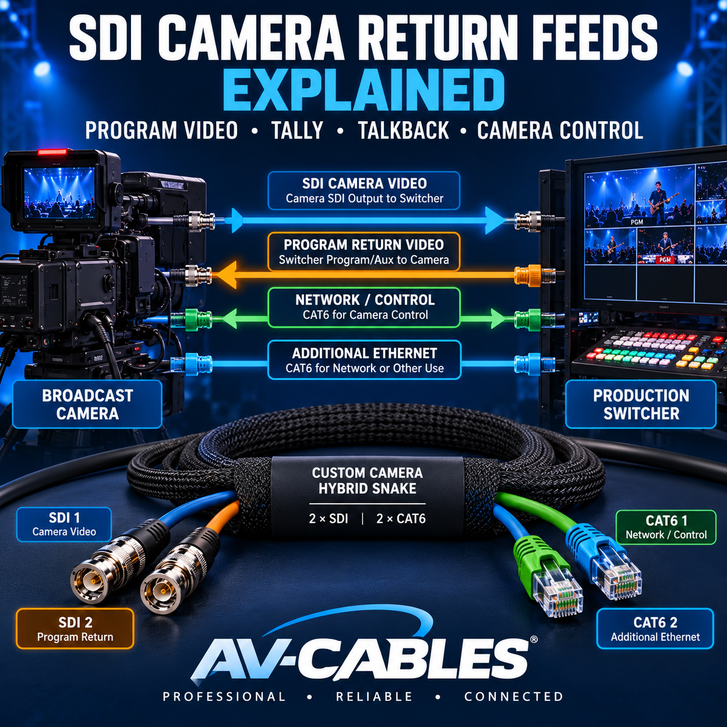
In a professional multicamera production, video normally travels from each camera to a production switcher.
But many broadcast camera systems also need video traveling in the opposite direction.
The camera operator may need to see the live program output, receive tally information, communicate with the director, or allow the production team to adjust camera settings remotely.
These functions are often supported through an SDI camera return feed.
Understanding how SDI return video works can help production companies, broadcast engineers, houses of worship, and AV integrators design more effective camera systems.
In this guide, we'll explain the purpose of SDI camera return connections, how program video and camera control can share an SDI signal, and how to select professional cables for a complete camera installation.
WHAT IS AN SDI CAMERA RETURN FEED?
An SDI camera return feed is a video signal sent from the production system back toward a compatible broadcast camera.
In a typical multicamera installation, the camera sends its own video output to the production switcher.
The switcher may then send a separate video signal back to the camera.
This return signal might contain the live program output, a selected auxiliary feed, or another video source depending on the production system.
On compatible equipment, the return connection may also carry additional information such as tally, talkback audio, and remote camera-control commands.
THE SIMPLE EXPLANATION
CAMERA SDI OUTPUT: Sends the camera's video to the production system.
CAMERA SDI RETURN INPUT: Receives a compatible video signal from the production system.
Together, these connections allow video to travel in both directions using separate SDI signal paths.
HOW DOES TWO-WAY SDI CAMERA WIRING WORK?
Many professional camera systems use two independent coaxial cables between the camera position and the production equipment.
One cable carries the camera's video toward the switcher.
The second cable carries the return video toward the camera.
TYPICAL TWO-WAY CAMERA CONNECTION
| BROADCAST CAMERA | PRODUCTION SWITCHER | |
| SDI OUT | → | SDI IN |
| SDI CHANNEL 1: CAMERA VIDEO TO SWITCHER | ||
| SDI RETURN IN | ← | PROGRAM / AUX OUT |
| SDI CHANNEL 2: RETURN VIDEO TO CAMERA | ||
The return path and any supported control functions depend on the specific camera and switcher.
Each SDI channel uses a professional 75-ohm coaxial transmission path.
For a camera system supporting 12G-SDI, both cables should be selected for the required SDI data rate, transmission distance, and connector configuration.
Important: Standard SDI coaxial connections are directional signal paths. Using two cables provides two independent directions of communication; it does not make one ordinary coaxial cable bidirectional.
WHY DOES A CAMERA OPERATOR NEED RETURN VIDEO?
During a live production, the camera operator usually sees the image being captured by their own camera.
However, seeing the production's program output can provide additional context.
For example, the operator may want to know:
- Which camera is currently on air
- What the audience is seeing
- Whether graphics or another camera are being displayed
- When the director is preparing to switch shots
- How their framing compares with the overall production
A compatible camera return system can provide access to this information without requiring a separate monitor at the camera position.
This is especially useful in sports production, live events, television studios, and multicamera streaming systems.
WHAT IS SDI TALLY?
Tally is a signaling system that helps camera operators identify when their camera is selected for a production function.
For example, a camera may display a red tally indicator when it is on air.
Some systems also provide a separate indication when a camera is selected for preview.
Compatible broadcast equipment can transport tally information through supported SDI ancillary-data or camera-control mechanisms.
In these systems, the return SDI connection may provide both video and tally information.
However, not every SDI camera or switcher supports tally through the same protocol.
Some installations use separate tally wiring or network-based control instead.
Installation tip: Before ordering camera cables, verify whether tally is provided through SDI, Ethernet, or a separate connector on the equipment.
HOW DOES TALKBACK WORK OVER SDI?
Talkback allows the production team to communicate with camera operators during a live event.
A director may use talkback to request a different shot, adjust framing, or coordinate an upcoming camera movement.
On supported camera systems, talkback audio can be carried as part of the SDI signal.
For example, certain compatible camera-and-switcher systems use embedded audio channels for talkback communication.
This can reduce the need for a completely separate talkback audio cable between the camera and production equipment.
However, the camera, switcher, and any intermediate equipment must support the required audio configuration.
Some productions use dedicated intercom systems instead.
The presence of an SDI connector alone does not guarantee talkback functionality.
CAN CAMERA CONTROL TRAVEL THROUGH THE SDI RETURN?
Yes, on compatible equipment.
Some professional camera systems support remote camera-control commands carried through the SDI return connection.
Depending on the camera and switcher, supported functions may include:
- Camera iris adjustment
- Color correction
- White balance
- Gain settings
- Black-level adjustment
- Focus or zoom control with compatible lenses
- Tally and related production information
This allows the production team to adjust supported camera settings from a central control position.
For example, certain Blackmagic Studio Camera and ATEM switcher combinations support camera control through the SDI program return path.
Compatibility matters: Camera-control functions depend on the manufacturer's supported protocol and equipment configuration. They are not universal features of every SDI connection.
WHAT CABLES ARE REQUIRED FOR A COMPLETE CAMERA CONNECTION?
A professional camera position may require more than a single video connection.
The exact number of cables depends on the camera model, production workflow, and supported interfaces.
| Connection | Purpose | Typical Cable |
|---|---|---|
| Camera SDI Output | Camera video to switcher | 75-ohm SDI coax |
| SDI Program Return | Video back to camera | 75-ohm SDI coax |
| Ethernet / Control | Network or compatible camera control | CAT6 |
| Additional Network | Additional network function or spare connection | CAT6 |
This is one reason hybrid camera snake cables are useful in professional production systems.
Instead of deploying four unrelated cables, the connections can be organized into one purpose-built assembly.
WHY USE A 2-SDI + 2-CAT6 CAMERA HYBRID SNAKE?
A camera hybrid snake combines multiple independent cable channels inside one organized cable assembly.
A common configuration uses:
FOUR-CHANNEL CAMERA HYBRID
CHANNEL 1: 12G-SDI camera video output
CHANNEL 2: 12G-SDI program return
CHANNEL 3: CAT6 network or camera control
CHANNEL 4: CAT6 additional network connection
ONE ORGANIZED CABLE LOOM — FOUR INDEPENDENT CONNECTIONS
The coaxial channels remain separate 75-ohm SDI transmission paths.
The CAT6 channels remain separate Ethernet cable connections.
The snake organizes the cables physically; it does not combine the signals or automatically provide camera-control functions.
This arrangement can help simplify deployment between a camera position and a production rack.
AV-Cables manufactures custom hybrid camera snake assemblies with 6G-SDI, 12G-SDI, and CAT6 channel options.
Explore Custom SDI + CAT6 Camera Hybrid Snakes
CHOOSING THE RIGHT SDI COAXIAL CABLE
Professional SDI return connections require cable assemblies appropriate for the signal format and distance.
The same considerations that apply to the camera's video output also apply to the return path.
Belden 4855R Mini RG59 for 12G-SDI
Belden 4855R is a compact professional 75-ohm coaxial cable designed for 12G-SDI applications.
Its small diameter makes it useful in custom camera snakes where several signal channels must be bundled together.
AV-Cables uses Belden 4855R in professional 12G-SDI cable assemblies and multi-channel snake configurations.
Shop Belden 4855R 12G-SDI Cables
Belden 1855A Mini RG59 for 6G-SDI
Not every camera system requires 12G-SDI.
For compatible SD, HD, 3G-SDI, and 6G-SDI applications, Belden 1855A provides a compact professional coaxial option.
Using the appropriate cable construction helps balance performance, bundle size, and installation requirements.
Explore 6G-SDI BNC Cable Options
What About Longer Camera Runs?
As cable length increases, signal attenuation becomes an important consideration.
For longer SDI paths, a larger coaxial construction such as professional RG59 or RG6 may provide additional transmission margin.
However, larger coax also increases the physical size and weight of a multi-channel snake.
Select cable construction based on the complete signal path, supported data rate, connected equipment, and required transmission distance.
DOES AN SDI RETURN CABLE NEED TO SUPPORT 12G-SDI?
Not necessarily.
The required cable performance depends on the video format actually transmitted through the return connection.
For example, a camera may support a high-bandwidth 12G-SDI output while the production system uses a lower-data-rate return format.
In that situation, the two signal paths may have different bandwidth requirements.
However, specifying 12G-SDI-capable assemblies for both paths can provide flexibility when the equipment and intended transmission distances justify that choice.
Always verify the return-video format supported by the camera and switcher.
CAMERA RETURN FEEDS IN LIVE PRODUCTION
Broadcast Television Studios
Studio cameras may send their video to a central production switcher while receiving program return, tally, and compatible control information.
Sports Production
Camera operators working at different positions may benefit from return video that shows the current program output.
Houses of Worship
Multicamera worship productions can use return video to help operators follow live switching decisions and coordinate camera shots.
Mobile Production Trucks
Portable production systems often need multiple camera connections deployed quickly.
Organized SDI and CAT6 hybrid snakes can help reduce the number of loose cable runs between camera positions and production equipment.
Corporate AV and Live Events
Professional event cameras may connect to switchers, recorders, monitoring equipment, and compatible camera-control systems.
Custom cable configurations allow integrators to design the physical connections around the equipment and venue layout.
COMMON CAMERA RETURN TROUBLESHOOTING PROBLEMS
1. Camera Video Works, but Return Video Is Missing
Confirm that the switcher or router is sending a compatible video format to the camera's return input.
Check the return cable separately from the camera output cable.
2. The Camera Does Not Display Tally
Verify that the camera and switcher support compatible tally signaling and that the required camera identification settings are correct.
3. Talkback Is Not Working
Check whether the camera and switcher support talkback over SDI.
Verify audio-channel assignments, headset connections, talkback settings, and any intermediate equipment.
4. Remote Camera Control Does Not Respond
Confirm that the camera-control protocol is supported by both devices.
Review camera numbers, control settings, return-feed routing, and supported equipment configurations.
5. Return Video Drops Out Intermittently
Inspect the complete return signal path for excessive length, damaged connectors, cable damage, incompatible equipment formats, or other signal-integrity problems.
FIVE THINGS TO CONFIRM BEFORE ORDERING CAMERA CABLES
- Camera connections: Identify the SDI output, return input, and any Ethernet or control connections.
- Required SDI format: Confirm whether each video path uses 3G, 6G, or 12G-SDI.
- Connector types: Determine whether the equipment uses BNC, HD-BNC, DIN 1.0/2.3, RJ45, or EtherCON-style connections.
- Cable length: Measure the actual route between the camera and production equipment, including required breakout lengths.
- Additional functions: Confirm how tally, talkback, camera control, and network functions are supported by the equipment.
Planning these details before ordering can help prevent unnecessary adapters, excess cable, and missing connections during installation.
FREQUENTLY ASKED QUESTIONS
What is an SDI camera return feed?
An SDI camera return feed is a video signal sent from the production system back to a compatible camera. It may provide program video and, on supported equipment, additional tally, talkback, or camera-control information.
Do I need two SDI cables for a camera?
If the camera sends video to a switcher and receives a separate SDI return signal, two independent SDI connections are commonly used.
Can one SDI cable carry video in both directions?
A conventional SDI coaxial connection carries one directional signal path. Two independent coaxial connections are commonly used for camera output and return video.
Does SDI carry tally information?
Compatible camera and production systems can carry tally information through supported SDI signaling mechanisms. Not all equipment uses the same method.
Can talkback travel over SDI?
Yes. Certain professional camera and switcher systems support talkback audio through embedded SDI audio channels.
Can a 12G-SDI cable be used for camera return video?
Yes. A properly constructed 12G-SDI cable can transport compatible lower-data-rate SDI signals as well. The equipment determines the supported video format and return functions.
What is a hybrid camera snake?
A hybrid camera snake combines independent SDI, Ethernet, or other supported cable channels into one organized assembly.
Does a hybrid snake automatically provide camera control?
No. The snake provides physical cable connections. Camera-control functionality depends on the connected equipment and supported communication protocols.
Can AV-Cables build a custom SDI camera snake?
Yes. AV-Cables manufactures custom camera hybrid snakes with configurable SDI and CAT6 channel combinations, connector types, breakout lengths, and channel identification.
THE BOTTOM LINE
An SDI camera return feed provides a useful connection from the production system back to a compatible broadcast camera.
Depending on the equipment, this connection can support program monitoring, tally, talkback, and remote camera-control functions.
However, reliable operation requires more than simply connecting two BNC cables.
The camera, switcher, signal formats, control protocols, and physical cable assemblies must all be compatible.
For multicamera production systems, custom SDI and CAT6 hybrid snake cables can organize the required connections into one practical assembly.
CUSTOM CAMERA HYBRID SNAKES FROM AV-CABLES
AV-Cables manufactures professional broadcast cable assemblies for multicamera production, broadcast studios, live events, production trucks, houses of worship, and commercial AV systems.
Our custom camera cable solutions can include:
- Two independent 12G-SDI video channels
- Two CAT6 Ethernet channels
- Custom 6G-SDI and 12G-SDI channel combinations
- Professional 75-ohm BNC connections
- HD-BNC and DIN 1.0/2.3 options
- RJ45 and EtherCON-style network connections
- Custom cable lengths and breakout configurations
- Numbered or color-coded channel identification
- Protective braided sleeving
Hand assembled in the USA and individually tested.
Whether you need one custom camera cable or multiple assemblies for a production facility, AV-Cables can help build the connectivity solution around your equipment.
Tell us your camera model, production switcher, signal requirements, cable lengths, and connector configuration.
CUSTOM CAMERA SNAKES SDI SNAKE CABLES REQUEST A CUSTOM QUOTE
AV-CABLES — PROFESSIONAL • RELIABLE • CONNECTED