
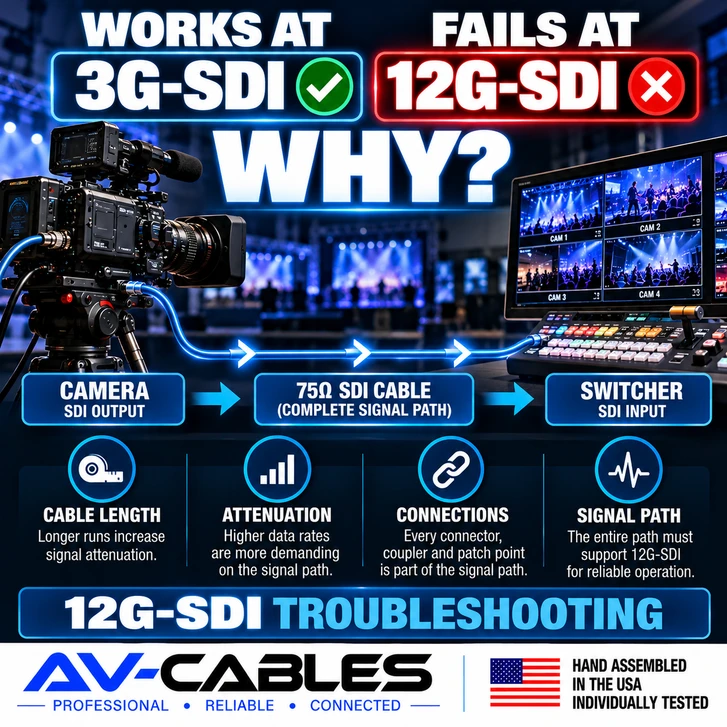
You connect an SDI cable between two pieces of equipment and get a perfect picture at 1080p. Then you switch the system to a higher-bandwidth 12G-SDI format and suddenly the picture disappears, flashes, drops out or becomes unreliable.
Does that mean the cable is bad?
Not necessarily.
A cable path that successfully carries a lower-rate SDI signal does not automatically have enough performance margin to reliably carry 12G-SDI.
As the SDI data rate increases, the complete signal path becomes more demanding. Cable length, coax construction, connectors, termination quality, patch points, adapters and physical cable condition can all become more important.
Here's what to investigate when 3G-SDI works but 12G-SDI does not.
FIRST: THE CABLE DOESN'T KNOW THE VIDEO RESOLUTION
It is helpful to think about the problem in terms of the SDI data rate rather than simply saying that one cable carries HD and another carries 4K.
The coaxial cable is carrying an electrical signal.
Different SDI formats place different transmission demands on that signal path.
This is why testing a questionable cable at 3G-SDI can produce a perfectly stable image even though the same path has problems when used for 12G-SDI.
WHY IS 12G-SDI MORE DEMANDING?
12G-SDI allows compatible professional video equipment to transport high-bandwidth UHD video over a single coaxial connection.
Compared with lower-rate SDI formats, the higher data rate places greater demands on the transmission path.
That means the performance of the entire connection matters:
- Coaxial cable
- Cable length
- BNC connectors
- Connector termination
- Patch panels
- Couplers
- Adapters
- Equipment interfaces
A weak point that causes no obvious problem at a lower data rate may become significant when the same path is used for 12G-SDI.
1. CHECK THE CABLE LENGTH
One of the first things to investigate is the total cable distance.
Signal attenuation increases as the cable becomes longer. The specific amount depends on the coaxial cable construction and operating frequency.
This is why different professional 75-ohm coax cables can have different practical transmission capabilities.
A compact Mini RG59 cable may be an excellent choice for rack wiring and shorter production connections, while a larger coax construction may be more appropriate when greater distance is required.
AV-Cables offers professional SDI BNC cable assemblies in several coax constructions for different production requirements.
2. LOOK AT THE TOTAL SIGNAL PATH — NOT JUST THE MAIN CABLE
A 100-foot cable is not necessarily a 100-foot signal path.
Consider a system built like this:
↓
SDI CABLE
↓
PATCH PANEL
↓
PATCH CABLE
↓
VIDEO ROUTER
↓
PATCH CABLE
↓
SWITCHER
The complete signal passes through every cable and connection in that path.
If troubleshooting a 12G-SDI problem, count the entire route rather than looking only at the longest cable.
3. CHECK EVERY CONNECTOR
The coax itself is only one part of an SDI cable assembly.
The connectors and their termination are also part of the transmission path.
Professional SDI systems are designed around a 75-ohm signal path. Using the appropriate coax and professional 75-ohm connectors helps maintain that path through the cable assembly.
When troubleshooting, inspect connectors for:
- Loose terminations
- Physical damage
- Bent or damaged connector components
- Connections that are not fully seated
- Unexpected adapters or couplers
A connection that appears mechanically acceptable can still deserve attention when troubleshooting a high-data-rate signal.
4. REMOVE COUPLERS AND ADAPTERS DURING TESTING
BNC couplers and adapters can be useful when they are appropriate for the application, but every additional connection becomes another part of the signal path.
If a 12G-SDI connection is unreliable, simplify the system temporarily.
Instead of testing:
try a direct connection when possible:
If the direct connection works, add the other components back one at a time.
This can help identify where the problem enters the signal path.
5. A CONTINUITY TEST IS NOT ENOUGH
This is one of the most important concepts when troubleshooting SDI cable.
A basic continuity tester can help identify problems such as an open conductor or short circuit.
But continuity does not demonstrate that a cable assembly will successfully carry a high-frequency 12G-SDI signal.
It does not answer: Will this complete cable assembly reliably transport the required 12G-SDI signal?
This explains how a cable can pass a simple continuity test and still be involved in an SDI performance problem.
6. INSPECT THE CABLE FOR PHYSICAL DAMAGE
Coaxial cable depends on its physical construction.
Look for signs of damage such as:
- Severe kinks
- Crushed sections
- Damaged jacket
- Repeated pinch points
- Connector strain
- Damage from carts or equipment
This is particularly important with portable production cables that are repeatedly deployed, walked on, coiled and transported.
If a questionable cable has obvious physical damage, remove it from the critical signal path and test with a known-good assembly.
7. TRY A SHORTER KNOWN-GOOD 12G-SDI CABLE
One of the quickest troubleshooting techniques is substitution.
If possible, move the equipment closer together and connect it with a short cable known to operate correctly at the required SDI rate.
If the short cable works at 12G-SDI but the original path does not, you have learned something important.
The problem is more likely associated with the original transmission path rather than simply the video settings on the two devices.
You can then investigate cable length, cable type, connectors, patch points and intermediate hardware.
8. IF 3G WORKS BUT 12G DOESN'T, THAT IS A USEFUL CLUE
Temporarily testing at a lower supported SDI data rate can be a useful diagnostic step.
Imagine this result:
12G-SDI = UNSTABLE ✕
That does not automatically identify the exact failed component.
But it suggests that you should investigate whether the complete path has sufficient performance margin for the higher-rate signal.
That is much more useful than immediately assuming the camera or switcher is defective.
9. MAKE SURE BOTH DEVICES ACTUALLY SUPPORT THE FORMAT
Do not overlook equipment configuration.
A cable cannot convert one SDI format into another.
Both ends of the connection need to support compatible formats.
Check:
- SDI data rate
- Resolution
- Frame rate
- Input configuration
- Output configuration
- Equipment documentation
A 12G-rated cable does not turn a 3G-SDI input into a 12G-SDI input.
10. CHOOSE THE COAX FOR THE APPLICATION
AV-Cables builds professional SDI assemblies using several coax constructions because one cable size does not fit every production environment.
Belden 4855R Mini RG59
Belden 4855R Mini RG59 provides a compact cable profile that works particularly well in production racks, fly packs and high-density installations.
Its smaller outside diameter makes it easier to route multiple cables where space is limited.
Belden 4505R RG59
Full-size RG59 provides another option when more transmission capability is needed while maintaining a manageable cable size.
It can be a useful middle ground between compact Mini RG59 and larger RG6 constructions.
Belden 4694R RG6
For longer 12G-SDI paths, a larger RG6 construction can provide lower attenuation than smaller coaxial cable constructions.
The tradeoff is a physically larger cable that requires more routing space.
DON'T FORGET HD-BNC AND DIN 1.0/2.3 CONNECTIONS
Some high-density professional video equipment uses compact connectors instead of full-size BNC.
AV-Cables offers HD-BNC cable assemblies for professional high-density video systems.
DIN 1.0/2.3 is another compact connector format found on professional broadcast equipment.
When troubleshooting a mixed-connector system, remember that every transition is part of the complete signal path.
A PRACTICAL 12G-SDI TROUBLESHOOTING ORDER
If 3G-SDI works but 12G-SDI does not, work through the system methodically instead of replacing random components.
- Verify the source and destination support the required format.
- Confirm the equipment settings.
- Test with a short known-good 12G-SDI cable.
- Remove unnecessary adapters and couplers.
- Bypass patch panels or intermediate equipment when practical.
- Inspect the original cable for physical damage.
- Check the total cable-path length.
- Confirm the coax construction is appropriate for the application.
- Inspect every connector and termination.
- Add components back one at a time until the problem returns.
This process helps isolate the problem rather than guessing which component is responsible.
THE BOTTOM LINE
If an SDI cable works at 3G-SDI but fails at 12G-SDI, don't assume the result is contradictory.
A lower-rate signal successfully passing through a cable only tells you that the path works under those conditions.
12G-SDI places greater demands on the complete transmission path.
When problems appear, investigate the cable type, total distance, connectors, terminations, couplers, adapters, patch points, physical condition and equipment configuration.
And remember: a continuity test is useful, but it does not prove that a cable assembly will successfully transport a 12G-SDI signal.
The best troubleshooting method is often the simplest—start with a short known-good connection and rebuild the signal path one component at a time.
NEED A RELIABLE 12G-SDI SIGNAL PATH?
AV-Cables builds professional 75-ohm SDI cable assemblies for cameras, switchers, routers, monitors, converters, production racks, fly packs and live-event systems.
Available configurations include Mini RG59, RG59, RG6, BNC, HD-BNC, DIN 1.0/2.3 and custom multi-channel assemblies.
Hand assembled in the USA and individually tested.
AV-Cables — Professional • Reliable • Connected