
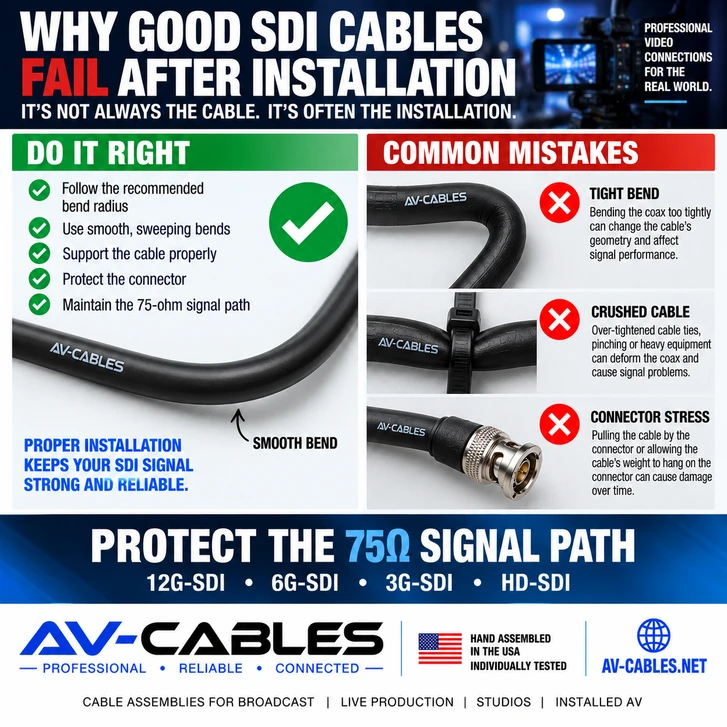
A professional SDI cable can test perfectly on the bench and still develop problems after it is installed.
Why?
Because an SDI cable is not just an electrical connection. It is a precision 75-ohm coaxial transmission path, and the physical condition of that path matters—especially as video data rates increase.
Tight bends, crushed cable, excessive pulling force and unsupported connectors can change the physical geometry of coaxial cable or damage its termination.
At lower data rates, a marginal cable may appear to work. Move the same installation to 6G-SDI or 12G-SDI, however, and problems may become much easier to expose.
Here are some of the most common physical installation mistakes that can turn a good SDI cable into an unreliable video connection.
1. BENDING THE COAX TOO TIGHTLY
Every coaxial cable has a minimum recommended bend radius.
Coax works because its center conductor, dielectric, shielding and outer jacket maintain a controlled physical relationship.
Forcing the cable around an excessively tight corner can deform that geometry.
This is particularly important with high-bandwidth SDI because maintaining a consistent transmission path becomes increasingly important as signal frequency rises.
Follow the cable manufacturer's bend-radius specification and use sweeping turns whenever possible.
2. PULLING THE CABLE BY THE BNC CONNECTOR
A BNC connector is designed to make an electrical and mechanical connection to equipment. It is not intended to function as a pulling handle.
Pulling an assembled cable through a rack, conduit or cable bundle by its BNC connector can place unnecessary stress on the termination.
Depending on the cable and connector construction, excessive force can affect the connector attachment, cable jacket, shield or center conductor.
When routing pre-terminated assemblies, support the cable itself and protect the connector from pulling and impact.
3. CRUSHING THE COAX WITH CABLE TIES
Cable management should organize the installation—not deform it.
Over-tightened cable ties can compress coaxial cable. Heavy equipment placed on a cable or cable bundles trapped against sharp rack edges can create similar problems.
A better approach is to secure coax firmly enough to control the bundle while avoiding visible jacket deformation.
Reusable hook-and-loop cable management can be useful in racks where cables are frequently changed or added.
4. PUTTING THE CABLE'S WEIGHT ON THE CONNECTOR
This is common behind monitors, routers, converters and densely populated equipment racks.
A cable leaves the BNC connector and immediately hangs downward with the entire cable run pulling on the equipment connection.
The heavier and longer the cable, the more important proper strain relief becomes.
Support the cable near the equipment so the connector is making the signal connection—not supporting the cable installation.
5. FORCING LARGE COAX INTO HIGH-DENSITY RACKS
Bigger coax is useful when lower attenuation and longer transmission distances are required.
But larger cable is not automatically the best choice everywhere.
A short patch between two adjacent pieces of equipment may benefit from a smaller cable construction because it can be easier to route without tight bends or excessive connector loading.
This is where Mini RG59, RG59 and RG6 each have different advantages.
| Cable Type | Typical Advantage | Common Application |
|---|---|---|
| Mini RG59 | Small diameter and easier routing | Racks, patching and high-density equipment |
| RG59 | Balance of size and transmission performance | General production and equipment interconnects |
| RG6 | Lower attenuation for longer runs | Longer facility and production cable paths |
Choose the cable construction for both the signal distance and physical installation.
6. IGNORING THE FIRST FEW INCHES BEHIND THE CONNECTOR
One of the most vulnerable areas of an installed cable can be immediately behind the connector.
If a cable leaves a BNC and is forced into a sharp 90-degree turn, the coax can experience concentrated bending stress near the termination.
Allow enough space behind equipment for the cable to transition naturally into the cable-management path.
This becomes particularly important in shallow racks and densely populated patching environments.
7. USING THE WRONG CABLE SIZE FOR THE APPLICATION
There is no single coax construction that is ideal for every SDI installation.
For example, AV-Cables uses several professional Belden coax constructions across its SDI cable families.
Belden 4855R Mini RG59 provides a compact 12G-capable option for shorter runs and dense rack environments.
Belden 4505R RG59 provides a larger 12G-capable construction where additional transmission distance is useful.
Belden 4694R RG6 provides a larger low-loss option for longer 12G-SDI runs.
The best cable is therefore not simply the smallest or largest cable. It is the construction that appropriately balances:
- SDI data rate
- Required distance
- Rack space
- Flexibility
- Routing requirements
- Connector type
- Installation environment
8. ASSUMING A CABLE IS GOOD BECAUSE VIDEO APPEARS
A picture appearing on a monitor does not necessarily prove that an installation has generous signal margin.
A marginal SDI path may operate normally until something changes.
For example:
- The system moves from 3G-SDI to 12G-SDI
- A longer cable is substituted
- An additional connection point is introduced
- The cable is moved or bent differently
- Equipment is changed
If a cable becomes intermittent when touched or repositioned, inspect the cable and connector rather than treating the symptom as an equipment problem.
9. DAMAGING CABLES DURING TEMPORARY PRODUCTION
Studio racks are not the only place physical cable damage occurs.
Live production cables may experience even harsher conditions.
Common hazards include:
- Road cases rolling across cable
- Doors closing on cable
- Cables being sharply bent during teardown
- Connectors being dragged across floors
- Heavy cable bundles pulling on equipment
- Improper coiling
Temporary production cables should be inspected regularly, particularly when they are supporting critical camera or video paths.
10. NOT TESTING AFTER INSTALLATION
A cable assembly may be individually tested before shipment, but the final installed signal path includes much more than the original cable assembly.
Installation introduces routing, bends, equipment connections and potentially patch panels, adapters or additional interconnects.
Testing after installation helps identify problems while the installation work is still fresh and accessible.
GOOD SDI INSTALLATION PRACTICE
- Respect the cable's recommended bend radius
- Do not pull assemblies by their connectors
- Avoid crushing or pinching coax
- Provide strain relief near equipment
- Choose cable size for both distance and routing
- Protect connectors during installation
- Inspect temporary production cables regularly
- Test the completed signal path
WHY 12G-SDI MAKES INSTALLATION QUALITY MORE IMPORTANT
12G-SDI allows high-bandwidth UHD video to travel over a single coaxial connection, but that performance places greater demands on the transmission path than lower-rate SDI systems.
An installation practice that seemed harmless in an older HD-SDI system may become more significant when that same infrastructure is expected to carry 12G-SDI.
That is why cable selection, termination quality and physical installation should be considered together.
If you're planning a new UHD installation, also read our guide to 12G-SDI cable distance.
WHAT IF AN SDI SIGNAL STARTS DROPPING?
If an installed SDI connection becomes unreliable, start with the physical signal path.
Inspect:
- The connector at both ends
- The first several inches of cable behind each connector
- Sharp bends
- Pinched or crushed sections
- Patch points and adapters
- Areas where the cable may have been pulled or damaged
Then verify that the cable construction and distance are appropriate for the SDI data rate being used.
For a broader troubleshooting checklist, see Why Does My SDI Signal Keep Dropping? 9 Common Causes and Fixes.
THE BOTTOM LINE
A high-quality SDI cable is only part of a reliable video connection.
How that cable is installed matters too.
Excessively tight bends, crushed coax, pulling on connectors and poor strain relief can turn a properly constructed cable assembly into a potential trouble spot.
As professional video systems move toward higher data rates such as 6G-SDI and 12G-SDI, protecting the physical integrity of the 75-ohm signal path becomes increasingly important.
Select the right coax construction, route it correctly, support it properly and test the completed installation.
PROFESSIONAL SDI CABLES FROM AV-CABLES
AV-Cables manufactures professional SDI cable assemblies for broadcast facilities, studios, live production, mobile trucks, fly packs, houses of worship, corporate AV and professional installations.
Available options include Mini RG59, RG59 and RG6 constructions with professional BNC, HD-BNC and DIN 1.0/2.3 connectivity.
AV-Cables assemblies are hand assembled in the USA and individually tested before shipment.
BUILDING OR UPGRADING AN SDI SYSTEM?
Tell AV-Cables your SDI format, equipment, connector type and required distance. We can help identify an appropriate professional cable construction for the application.
AV-Cables — Professional • Reliable • Connected