
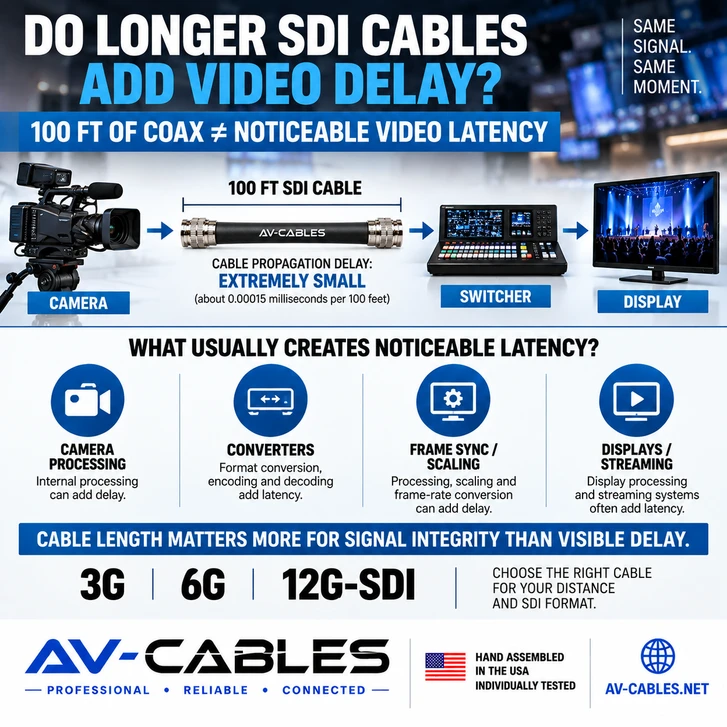
When troubleshooting video latency, one question occasionally comes up: Does using a longer SDI cable make the video noticeably later?
Technically, every transmission path takes time. An electrical signal does not travel through coaxial cable instantaneously.
But in a normal professional video installation, the propagation delay introduced by an additional length of SDI coaxial cable is extremely small compared with the delays that can be introduced by cameras, converters, scalers, switchers, displays and video-processing equipment.
That distinction is important when troubleshooting a system that appears to have noticeable video delay.
DOES SDI CABLE HAVE LATENCY?
Yes—in the strict technical sense.
Signals traveling through coaxial cable propagate at a substantial fraction of the speed of light. The exact propagation velocity depends on the construction and dielectric characteristics of the particular cable.
That means a longer cable introduces slightly more propagation delay than a shorter cable.
However, the important question for most production systems is not whether a measurable delay exists.
It is whether that additional delay is large enough for a person to notice.
For ordinary SDI cable distances, the answer is generally no.
HOW SMALL IS COAXIAL CABLE PROPAGATION DELAY?
As a useful illustration, assume a coaxial cable has a propagation velocity around two-thirds the speed of light.
A signal would travel approximately 100 feet through that cable in roughly 150 nanoseconds.
That is approximately:
100 ft of coax ≈ 0.00015 milliseconds of propagation time
The exact figure varies with cable construction, so this should be treated as an illustration rather than a specification for every SDI cable.
Even so, it demonstrates the scale involved.
A noticeable video-processing delay is typically vastly larger than the propagation difference created by adding another few dozen feet of coax.
WHAT ACTUALLY CAUSES NOTICEABLE VIDEO LATENCY?
If a professional video system has noticeable latency, look beyond the coax first.
Potential sources can include:
- Camera image processing
- Frame synchronization
- Video scaling
- Format conversion
- Frame-rate conversion
- Multiviewer processing
- Encoding and decoding
- Streaming systems
- Display image processing
- PTZ camera processing
Some devices may buffer one or more frames before producing an output.
A single frame at 60 frames per second represents approximately 16.7 milliseconds.
Compare that with the tiny fraction of a millisecond associated with propagation through a typical production-length coaxial cable and the difference becomes clear.
LONGER SDI CABLES CREATE A DIFFERENT PROBLEM: SIGNAL LOSS
Although cable length normally does not create noticeable video latency, it absolutely matters for signal integrity.
As SDI cable length increases, attenuation increases.
Eventually the receiving equipment may no longer be able to reliably recover the signal.
Symptoms can include:
- Intermittent picture
- Video dropouts
- Sparkles or errors
- Loss of synchronization
- No video at all
This is why selecting the correct cable for the required distance is much more important than worrying about cable-induced latency.
For more information, see our 12G-SDI cable distance guide.
DOES 12G-SDI HAVE MORE CABLE LATENCY THAN 3G-SDI?
It is easy to assume that because 12G-SDI carries substantially more data, the video must travel through the cable more slowly.
That is not how the cable propagation delay should be viewed.
The higher data rate primarily changes the demands placed on the transmission path, including attenuation and signal-integrity requirements.
In practical installations, the important difference is that 12G-SDI generally has less usable cable-distance margin than lower-rate SDI formats when all other factors are equal.
Therefore, cable construction and distance become particularly important when designing a 12G-SDI system.
MINI RG59 VS RG59 VS RG6
Choosing between Mini RG59, standard RG59 and RG6 should generally be driven by factors such as:
- Required SDI format
- Total cable distance
- Available installation space
- Flexibility requirements
- Rack density
- Permanent vs portable use
It should not normally be driven by concern that a larger or longer cable will create perceptible video latency.
For shorter and high-density applications, Mini RG59 can provide convenient routing and compact cable bundles.
For longer transmission paths, larger professional coax constructions may provide lower attenuation.
See our Mini RG59 vs RG59 vs RG6 SDI cable comparison for a deeper look at these choices.
WHAT ABOUT TWO CAMERAS WITH DIFFERENT CABLE LENGTHS?
Imagine Camera A uses a 25-foot SDI cable while Camera B uses a 200-foot cable.
Technically, the signal from Camera B spends slightly more time propagating through the coax.
But the difference is measured on a scale far below a video frame.
If the two cameras appear substantially out of sync, investigate the cameras and signal-processing paths rather than assuming the extra coax length is responsible.
For example, the cameras may have different internal processing, output formats or synchronization configurations.
PTZ CAMERA SYSTEMS AND VIDEO DELAY
PTZ camera installations are a common place to encounter latency questions because the camera may be located 100 feet or more from the production position.
Again, the SDI cable itself is unlikely to be the source of a noticeable delay.
Camera processing, conversion, switching, streaming and display processing deserve much more attention.
If you are designing a PTZ installation, our PTZ camera SDI cabling guide covers cable size, distance and connector selection.
WHAT ABOUT SDI EXTENDERS AND CONVERTERS?
This is where an important distinction needs to be made.
A passive coaxial cable simply transports the electrical signal.
An active device may process that signal.
Converters, extenders, scalers, frame synchronizers and other active devices can potentially introduce processing delay depending on their design.
Therefore, when troubleshooting latency, map the complete signal path:
Camera → SDI Cable → Converter → Switcher → Converter → Display
Then identify which components perform active processing.
DO BNC COUPLERS ADD VIDEO DELAY?
A passive BNC coupler does not create the kind of processing latency associated with active electronics.
However, adding a coupler creates another connection in the RF transmission path.
The greater concern is therefore signal integrity rather than perceptible latency.
Use professional 75-ohm components and remember that the lengths of both cables form one complete transmission path.
DO HD-BNC OR DIN 1.0/2.3 CONNECTORS CHANGE LATENCY?
Connector format is not normally a meaningful source of perceptible video latency.
Standard BNC, HD-BNC and DIN 1.0/2.3 are used in professional video systems for different equipment-density and interface requirements.
The important considerations are maintaining the appropriate 75-ohm signal path, using components suited to the required SDI format and maintaining good installation practices.
SDI LATENCY TROUBLESHOOTING CHECKLIST
1. Don't assume cable length is causing visible latency.
2. Identify every active device in the signal path.
3. Check cameras for different processing or output settings.
4. Look for frame synchronizers and format converters.
5. Check streaming encoders and decoders.
6. Investigate display processing.
7. Treat cable distance primarily as a signal-integrity consideration.
8. Use cable appropriate for the SDI data rate and required distance.
THE BOTTOM LINE
Does a longer SDI cable technically add more propagation delay? Yes.
Will normal differences in professional SDI cable length create noticeable video latency? Generally, no.
If you can visibly see one video source lagging another, active video processing is a much more likely place to investigate.
Cable length remains extremely important—but primarily because of attenuation, signal integrity and the maximum reliable transmission distance for the SDI format being used.
PROFESSIONAL SDI CONNECTIVITY FROM AV-CABLES
AV-Cables manufactures professional cable assemblies for broadcast, video production, studios, houses of worship, corporate AV, live events, government, OEM and systems integration applications.
Available configurations include Mini RG59, RG59 and RG6 SDI cable assemblies, HD-BNC cables, DIN 1.0/2.3 assemblies and multi-channel SDI snake cables.
AV-Cables professional cable assemblies are hand assembled in the USA and individually tested before shipment.
PLANNING A PROFESSIONAL SDI SYSTEM?
Tell us your video format, equipment, connector requirements and cable distances. AV-Cables can help identify an appropriate cable construction and configuration for your application.
AV-Cables — Professional Broadcast Connectivity Solutions